This topic includes the following sections:
- Connect string
- Network string (opennet_info) syntax
- Driver and database_info notes and examples
- Using the SQL Server shared memory protocol
To connect to a database, you must pass a connect string to %SSC_CONNECT. A connect string contains the information needed to access a database, information such as the database name, username, and password. The connect string also determines whether SQL OpenNet will be used for the network layer.
Connect string
There are two forms of connect string. The first starts with the driver argument and connects directly (without using SQL OpenNet) to a local database or database client. The second form (which starts with net:), uses SQL OpenNet for access over a network. (For examples, see Driver and database_info notes and examples.)
driver:database_info
net:database_info@opennet_info
driver
The name of the database driver to be used. See Driver and database_info.
database_info
Information used for database access. See Driver and database_info.
opennet_info
Information needed to access an SQL OpenNet service on the machine that has the target database (or database client). See Network string (opennet_info) syntax.
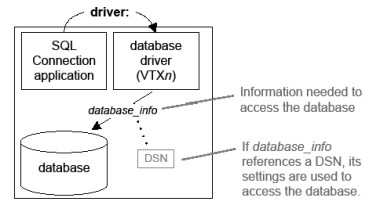
To access a local database (as illustrated in figure 1 below), use the first connect string form (driver:...). There is an exception: for 32-bit SQL Connection applications that run on 64-bit Windows, all connections — even local — must use the second form (net:...).
|
|
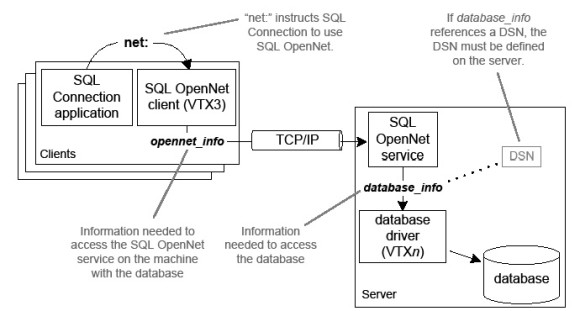
To access a remote database, use the second connect string form (net:...), which uses SQL OpenNet. Your application will connect to the SQL OpenNet server specified by opennet_info and the database specified by database_info, as illustrated in figure 2.
|
|
You can connect directly to a local database client for a remote database. However, unless you are using clustering, we recommend using SQL OpenNet instead. It generally results in better performance, and the database driver does not need to be installed on each client (a requirement when connecting directly). Additionally, using SQL OpenNet, enables you to use the shared memory protocol for SQL Server, which otherwise would not be available for remote connections.
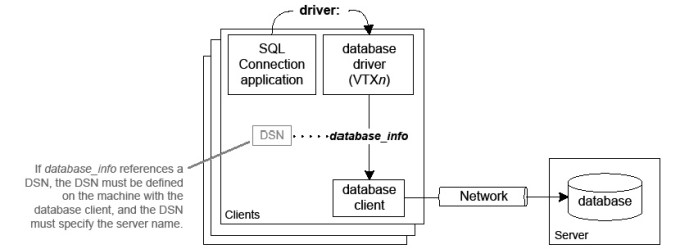
If you use clustering, you must use a direct connection for a remote database. For failover protection, the connection must use the database’s network facilities (by connecting directly to a local database client, as illustrated in figure 3) rather than SQL OpenNet.
|
|
The table below lists database drivers and the database_info syntax for them.
|
Database_info syntax |
||
|---|---|---|
|
Oracle 10 through 12 on Windows |
VTX0_10, VTX0_11, VTX0_12 |
userid/password[/net_service_name]
See Oracle notes and examples below. |
|
Oracle on UNIX and OpenVMS |
VTX0 |
|
|
Oracle Rdba |
VTX1 |
schema_name |
|
Sybasea |
VTX2 |
userid[/[password]/[database_name]/[server]/[appname]/ |
|
Synergy Database |
VTX4 |
userid/[password]/sdms:connect_file |
|
Informixa |
VTX5 |
One of the following: database_name[@server] path_name/database_name[@server] userid/password/database_name[@server] userid/password/path_name/database_name[@server] |
|
IBM DB2a |
VTX7 |
database_name or userid/password/database_name |
|
ODBC-complianta |
VTX11 |
userid/[password]/dsn
See VTX11 (ODBC) notes and examples below. |
|
SQL Server |
VTX12_SQLNATIVE |
userid/[password]/dsn or userid/[password]/[database_name]/[server_name
[\\instance_name]]/[app_name]/[language][/other_options]
See SQL Server notes and examples below. |
|
MySQL |
VTX14 |
userid/[password]/[database]/[server]
See MySQL connect string examples below. |
|
PostgreSQL on Windowsa |
VTX16 |
userid/password/database_name/options
See PostgreSQL notes below. |
a. Support for these databases may require assistance from Synergex Professional Services and additional support fees. Contact your Synergy/DE account manager for details.
Note the following for driver:
- On Windows, a database driver consists of a DLL and an executable, which are located in the synergyde\connect directory. (The driver argument represents both.) Do not include a path for driver—just the driver name itself.
- On UNIX, driver is a shared object (an .so file) that is installed in the synergyde/connect directory. Driver can include a path on UNIX, but there is no need to specify one unless you move the shared object to a directory other than synergyde/connect.
- On OpenVMS, driver is a database driver (an .exe shared image file) that is located in the SYS$COMMON:[SYSLIB] directory. Do not include a path for driver—just the driver name itself.
Network string (opennet_info) syntax
The opennet_info argument (see Arguments) provides the information needed to connect to the SQL OpenNet service on the machine that has the database (or a client for the database). Here is the syntax:
@[port:]host[([domain\]uid/pwd)]!driver[,ENV_VAR=env_spec,...]
Arguments
port
(optional) The port number for communicating with SQL OpenNet server. See Port settings.
host
The IP address or name of the machine that has the database or database client. This can be up to 64 characters long. On OpenVMS, an IP address must be in IPv4 format. On Windows and UNIX it can be in IPv4 or IPv6 format, depending on what the SQL OpenNet service is set to recognize. Note that each colon in an IPv6 address must be escaped with another colon—e.g., fe80::::2cb8::ddce::c127::3cf4. See vtxnetd and vtxnet2 programs for information.
([domain\]uid/pwd)
(optional) Login information (user ID and password) for an account on the host machine or, if domain is also specified, an account on a domain (Windows only). This is different from the user ID and password for the database, which are passed as database_info in the connect string.
driver
The name of the database driver to be used. See Driver and database_info.
ENV_VAR=env_spec
(optional) An environment variable definition stored in or used by the target database (generally for specifying or locating data files).
The network string (opennet_info) is the part of a connect string that starts with an “at” sign (@). Include it only if the connect string starts with net:. In the following, for example, the bold text is the network string (1958 is port, win_srv is host, and VTX12_SQLNATIVE is driver):
net:my_uid/my_pwd/my_dsn@1958:win_srv!VTX12_SQLNATIVE
Use domain, uid, and pwd only if the -a option is specified for vtxnetd or vtxnet2. (See vtxnetd and vtxnet2 programs for information.) The parentheses and slashes are required for these arguments—e.g., (my_domain\my_uid/my_pwd). Use the backslash only for a Windows domain.

|
When using vtxnet2 to access a database on a Windows server, the “Log on as a batch job” option must be set for the user account specified by uid. Domain user accounts must have a group policy that includes the “Log on as a batch job” option. |
Overriding delimiters in a network string
SQL OpenNet uses special characters as string delimiters: the at sign (@), colon (:), and exclamation point (!). In the network part of a connect string, each of these delimiters conveys a specific instruction to the SQL OpenNet processor and generally is not passed by the processor unless an identical character follows the first. If you want to pass an at sign, colon, or exclamation point as part of an environment variable definition, or at any other place in the network connect string, you must use a duplicate at sign, colon, or exclamation point to ensure that the parser will interpret the statement correctly.
For example, @unix_srv in the following connect string is the host name of the computer containing the database.
net:my_uid/my_pwd@@unix_srv!/usr/synergyde/connect/VTX0
In the following, DBDATA is set to datdir!.
net:my_uid/my_pwd@unix_srv!/usr/synergyde/connect/VTX0,DBDATA=datdir!!
The following connect string uses two “at” signs to force the first to become the delimiter for a network string for a second server. (See the Synergex KnowledgeBase article 100002075 for more information on this configuration.)
net:my_uid/my_pwd@88.0.0.12!/usr/bin/VTX3@@unix_srv2!/bin/VTX0
To make a connection with SQL OpenNet, the port setting on the client must match the port number for the SQL OpenNet server. For example, if vtxnetd is started on port 1990, the client must use port 1990 to connect to it.
On the server, you can specify the port number in the following. We recommend setting it in the vtxnetd or vtxnet2 command.
- the vtxnet setting in the TCP/IP services file, which is in %windir%\system32\drivers\etc on Windows and /etc on UNIX. A port setting in this file is used only when the port is not specified in the vtxnetd or vtxnet2 start-up command on a Windows or UNIX server.
- the vtxnetd or vtxnet2 command line in opennet.srv (on Windows), or the vtxnetd command line in the startnet script (on UNIX) or NET.COM (on OpenVMS). On Windows and UNIX, this overrides a services file setting. On OpenVMS, port 1958 (the default) is used if the vtxnetd command does not specify a port number.
For more information on server-side port settings, see Configuring Connectivity Series.
On clients, you can specify the port number in the following. We recommend setting it in the connect string.
- the vtxnet setting in the TCP/IP services file, on Windows (%windir%\system32\drivers\etc) and UNIX (/etc). This is the default port setting, but it is used only when there is no other port setting on the client. For more information, see Configuring Connectivity Series.
- a port setting in net.ini. If set here, this overrides a services setting. (Connect string settings override a port setting in net.ini.) For more information, see Setting connect string defaults and encryption in net.ini.
- a port setting in the connect string. A port setting in the connect string overrides all other port settings for a client.
A quick way to ensure your port settings match is to use either the synxfpng utility (with the -x option) or the vtxping utility. For details, see synxfpng utility and vtxping utility.
Driver and database_info notes and examples
The following sections discuss arguments for the database_info portion of a connect string (see Driver and database_info) and provide examples for several of the supported databases/drivers.
The net_service_name argument in database_info specifies a database instance and is required if the database has multiple instances. Note that the spelling of the database instance name must match the spelling used in the SQL*Net configuration file TNSNAMES.ORA. As an alternative to the net_service_name argument, you can use the ENV_VAR argument documented in Network string (opennet_info) syntax to set the Oracle system ID (SID) for the instance. See Oracle documentation for more information.
We recommend using SQL OpenNet for network connections, but you can connect directly to an Oracle database via the Oracle client. If you do, note the following:
- Oracle will use SQL*Net to make the connection, so the connect string must use SQL*Net syntax. (See Oracle documentation.) For example, the following connects to an Oracle 11 server named oracle_srv:
VTX0_11:my_uid/my_pwd/oracle_srv
- You must first source the Oracle script oraenv to connect directly to an Oracle database on UNIX.
We recommend against recycling database connections, See Database connections.
Connect string examples for Oracle
The following connects directly to a local Oracle 10 database or database client on a Windows machine. Database_info is my_uid/my_pwd.
VTX0_10:my_uid/my_pwd
The next connect string uses SQL OpenNet to connect to a Windows server (win_srv).
net:my_uid/my_pwd@1958:win_srv!VTX0_10
The next uses SQL OpenNet to connect to a UNIX server. Note that the connect string includes a path for the database driver (VTX0). This is necessary if the database driver is not in the synergyde/connect directory.
net:my_uid/my_pwd@1958:unix_srv!/usr/my_dir/connect/VTX0
The next example also uses SQL OpenNet to connect to a UNIX server. Host_uid/host_pwd is used to log on to the server (unix_srv), and my_uid/my_pwd is used to log on to the database on the server. Again, because the database driver is not in the synergyde/connect directory, the connect string includes a path for the database driver.
net:my_uid/my_pwd@1958:unix_srv(host_uid/host_pwd)!/usr/mydir/connect/VTX0
The following uses SQL OpenNet to connect to an OpenVMS server.
net:my_uid/my_pwd/my_instance.com@1958:vms_srv!VTX0
VTX11 (ODBC) notes and examples
To access a database using the ODBC database driver (VTX11), a user or system DSN must be defined for the database. For SQL OpenNet connections, the DSN must be on the server. For direct connections, the DSN must be on the clients. See Microsoft documentation for information on DSNs.
Connect string examples for VTX11
The following example connects directly to an ODBC-compliant database (in other words, it does not use SQL OpenNet). Database_info is my_uid/my_pwd/my_dsn. Information on the database is in the DSN (my_dsn).
VTX11:my_uid/my_pwd/my_dsn
The next example uses SQL OpenNet to connect to a Windows server (win_srv). Database_info is my_uid/my_pwd/my_dsn.
net:my_uid/my_pwd/my_dsn@1958:win_srv!VTX11
For SQL Server, there are two syntax forms for the database_info section of the connect string. See Driver and database_info, and note that if database_info has
- only two forward slashes, the first form (userid/[password]/dsn) is used to interpret the connect information.
- more than two forward slashes, the second form is used:
userid/[password]/[database_name]/[server_name[\\instance_name]]/[app_name]/
[language][/other_options]
With this second form, you can create a DSN-less connection, or you can specify a DSN with the other_options argument. See Other options below.
|
|
DSN-less connections are not recommended. Error messages generated by SQL Server and other layers used to access the database can be misleading with these connections. Connections that use DSNs are much easier to configure and test. |
Note the following:
- For SQL OpenNet connections, DSNs must be system DSNs on the server. For direct connections, DSNs must be user or system DSNs on the clients.
- Make DSN access local when you set up the SQL Server database instance, and use the shared memory protocol. See Using the SQL Server shared memory protocol.
- Windows authentication is not supported for SQL OpenNet connections, so for these connections, make sure your SQL Server database is set up to use SQL Server authentication. For example, with SQL Server 2012 you can use SQL Server Management Studio to set the “SQL Server and Windows Authentication mode” option.
- For Azure SQL Database, use a direct connection (do not use SQL OpenNet), and pass the Azure SQL Database URL as server_name. Make sure variables used for the connect string are large enough to store the full string, which will be longer than most because of the URL. Microsoft ODBC Driver 17 for SQL Server is the only driver supported for Azure SQL Database.
By default, SQL Connection uses Microsoft ODBC Driver 17 for SQL Server. If SQL Connection is unable to use this driver, it attempts to use the following drivers in this order:
- Microsoft ODBC Driver 13.1
- Microsoft ODBC Driver 13
- SQL Server Native Client (sqlncli) 11 (Unsupported)
- SQL Server Native Client (sqlncli) 10 (Unsupported)
- SQL Native Client, which is the version of sqlncli that preceded version 10 (Unsupported)
|
|
Though SQL Connection will attempt to use an older, (possibly unsupported) driver for SQL Server if the latest is not available on your machine, we recommend that you always use the most recent driver with the latest update. |
You can explicitly specify a driver by passing Driver={driver_name} in other_options. Driver_name must be a name returned by the ODBC API function SQLDrivers(). See Other options and Connect string examples for SQL Server below for more information.
See also Notes on drivers and databases.
The other_options part of the second form of database_info represents a string that can contain SQLDriverConnect() options that are specific to SQL Server. See Microsoft documentation for SQL Server for information on these options. This string can contain multiple options separated by semicolons (;). For example, the following uses the SQL Server shared memory protocol (Network=dbmslpcn) and includes a DSN specification (DSN=my_dsn):
VTX12_SQLNATIVE:my_uid/my_pwd/////Network=dbmslpcn;DSN=my_dsn
Connect string examples for SQL Server
Note that some of the following examples continue on a second line. In your applications, each connect string should be in one line of code.
The first example below illustrates the first form of database_info syntax: (userid/[password]/dsn). It creates a direct connection (i.e., SQL OpenNet is not used), and the information in the DSN determines whether the database is local or remote.
VTX12_SQLNATIVE:my_uid/my_pwd/my_dsn
The next example is also for a direct connection, but it uses the second form of database_info syntax. Note that the DSN (my_dsn) is passed in the other_options part of database_info. The connection will use the SQL Server shared memory protocol (which improves performance) because the connect string includes Network=dbmslpcn. It will also use multiple active result sets (MARS) because the connect string sets MARS_Connection=yes.
VTX12_SQLNATIVE:my_uid/my_pwd/my_db////Network=dbmslpcn;DSN=my_dsn;
MARS_Connection=yes
The next example uses SQL OpenNet to connect to a port number 1960 on a Windows server (win_srv).
net:my_uid/my_pwd/my_db////Network=dbmslpcn;DSN=my_dsn;
MARS_Connection=yes@1960:win_srv!VTX12_SQLNATIVE
The following example uses the first form of database_info syntax and uses SQL OpenNet to connect to a Windows server. Database_info is my_uid/my_pwd/my_dsn, port is 1960, and host is win_srv.
net:my_uid/my_pwd/my_dsn@1960:win_srv!VTX12_SQLNATIVE
The next three examples are for DSN-less connections (which we do not recommend using). The first is for a direct connection that uses the second form of database_info. With this example, no user ID, password, or DSN is specified. Instead, the connect string instructs SQL Server to use Windows authentication (Trusted_connection=yes) for the user ID and password, and the SQL Server driver is specified by passing Driver={SQL Server Native Client 11.0}. Both are passed as other_options. My_db is the database name, and my_instance is the instance name. The period before my_instance indicates that the instance is on the local machine.
VTX12_SQLNATIVE://my_db/.\\my_instance///
Driver={SQL Server Native Client 11.0};Trusted_connection=yes
The following specifies an instance name (TESTDB):
vtx12_sqlnative:my_uid/my_pwd//my_server\\TESTDB
The following uses SQL OpenNet and specifies a database name (db_name) and an application name (app_name):
net:my_uid/my_pwd/db_name//app_name/@1958:win_srv!VTX12_SQLNATIVE
The following uses the second form of the syntax for SQL Server to connect to an Azure SQL Database named my_db at my-azure-sql-db.net:
vtx12_sqlnative:my_uid/my_pwd/my_db/my-azure-sql-db.net\\//
Connections to MySQL use the MySQL database driver, VTX14.
The following connect string is for a direct connection (i.e., it does not use SQL OpenNet). Database_info is my_uid/my_pwd/my_db.
VTX14:my_uid/my_pwd/my_db
This next example uses SQL OpenNet to connect to a Windows server (win_srv). Database_info is my_uid/my_pwd/my_db.
net:my_uid/my_pwd/my_db@1958:win_srv!VTX14
The next example uses SQL OpenNet to connect to a Linux server (linux_srv). Because the database driver is not in the synergyde/connect directory, the connect string includes a path for the driver.
net:my_uid/my_pwd/my_db@1958:linux_srv!/usr/my_dir/connect/VTX14
The options argument in database_info must be a string with connection parameters specified as key = value pairs.
To access a PostgreSQL database via SQL Connection, you must install OpenSSL DLLs to the Synergy\dbl\bin directory that corresponds to the bitness of your Windows machine. See OpenSSL requirements for more information.
Using the SQL Server shared memory protocol
For improved performance with SQL Server, use the SQL Server shared memory protocol. This reduces the number of TCP/IP sockets used for a connection, making it less likely that all sockets for the server will be used at one time, which can greatly impede performance. Note the following:
- For remote databases, the SQL Server shared memory protocol is available only if you use VTX12_SQLNATIVE and if you use SQL OpenNet for all network connections. The DSN must be on the machine that has the SQL Server database.
- When you configure the DSN, select “(local)” as the server name in the DSN configuration screen, and prefix this with “LPC:” (without quotes)—i.e., LPC:(local). See figure 4 below.

To use the shared memory protocol with a DSN-less connection (which is not recommended), use the second form of syntax for database_info and either omit the server name from database_info or add the shared memory protocol option to the other_options string—for example., Network=dbmslpcn or Server=LPC:(local). See Microsoft documentation for information on SQL Server options. For example, the following uses the Network=dbmslpcn option:
VTX12_SQLNATIVE:my_uid/my_pwd/my_db////Network=dbmslpcn
The next example also uses this option, but connects to a remote database:
net:my_uid/my_pwd/my_db////Network=dbmslpcn@1958:win_srv!VTX12_SQLNATIVE